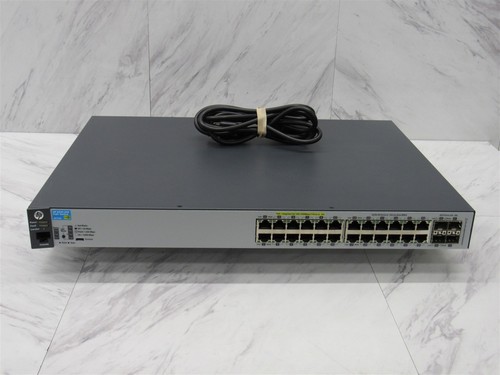
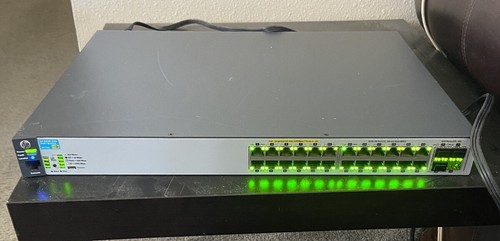
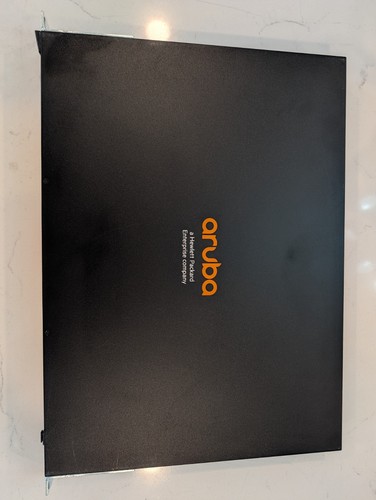
HP's 2013 install guide for the 2530 family lists twelve models, and the J9773A is the 24-port gigabit PoE+ one. It has 24 PoE+ gigabit ports and four SFP slots, and HPE's parts listing gives it up to 30 W per device and 190 W in total. That's six access points or cameras at full draw, or more if they sip power. Early units wear the HP badge. After HP bought Aruba Networks in 2015, it folded its own switching into Aruba, and the same J9773A was sold as the Aruba 2530 24G PoE+. Unlike the fanless 2530-24, this one has fans. HP rates it at 43.9 dB at the virtual workspace, the loudest of the 24-port 2530s, so put it in a closet or a rack. Home-labbers buy it to power a few access points from one managed switch. If you don't need PoE, the 2530-24G is quieter at 34 dB.
HP 2530-24G-PoE+ (J9773A), the original HP badgeAruba 2530 24G PoE+ (J9773A), the same switch under the later Aruba name2530-48G-PoE+ (J9772A), 48 ports2530-24G (J9776A), no PoE
We couldn't find HP's feature list for the 2530, so we won't promise a feature set beyond what the switch shows. Ask the seller for show version and plan on the features of the release it runs.
Software and support
It runs ArubaOS-Switch, and HPE's 16.05 management guide, published April 2018, covers the 2530 family. We couldn't find an end-of-sale or end-of-support notice for the J9773A on HPE's parts site.
Fans and power
This one has fans. HP rates it at LpA 43.9 dB at the virtual workspace (DIN 45635 T.19), the loudest of the 24-port 2530s, so it suits a closet or rack better than a desk. The fanless 2530s are the 2530-24, 2530-48 and the 8-port models.
PoE
HP's parts listing gives PoE+ at up to 30 W per device and 190 W in total. That's six devices at the full 30 W, or more at lower draw.
Ports and optics
There are 24 gigabit PoE+ ports and four SFP slots for gigabit uplinks. Optics usually aren't included, so check the photos for transceivers if you want fiber.
Reset and console
Hold Clear alone for a second to delete the console passwords. For factory defaults, press Reset and Clear together, let go of Reset, and release Clear when the Self Test LED starts to flash. The console is RJ-45 with an RJ-45 to DB-9 cable, plus a micro USB console port (cable not supplied).
Should come with it
RJ-45 to DB-9 console cable (supplied)
Rack mount brackets and screws
AC power cord
Check the listing photos against this list, and ask the seller about anything you can’t see. A missing piece should come off the price.
What to check
Most trouble is the previous owner's config and passwords, not the hardware. Remember the 190 W total when you plan what it will power.
01Model: Check the label in the photos says J9773A. The 48-port J9772A and non-PoE J9776A are easy to mix up.
02Ports: Count the ports in the front photo. You want 24 RJ-45 ports and four SFP slots.
03PoE: Ask the seller for a photo of show power-over-ethernet. It should report the 190 W budget with no faults.
04Software: Ask the seller for a photo of show version. A 16.x ArubaOS-Switch release is what you want to see.
05Fans: Listen to it on arrival. A steady hum is normal, but grinding or rattling means a fan needs replacing.
06Optics: Look in the photos for transceivers in the SFP slots. Most listings have none, so budget for your own.
07Rack ears: Look for the rack brackets in the photos or ask the seller. A complete unit has both ears and their screws.
08Console cable: Ask whether the RJ-45 to DB-9 console cable is included. A micro USB cable also works on the front console port.
09Reset: Run the Reset and Clear factory reset on arrival. The Self Test LED should flash and it should boot to defaults.
We'd buy mr.itparts' J9773A at $45 with free shipping, the cheapest here, with a power cord in the photo. There are at least 96 for sale and most ask $70–120 delivered around an $86 median, but more than a dozen US units ask under $80, so you can hold out for rack ears or a power cord. None of the cheap ones is titled tested or reset, so ask for show power-over-ethernet with the 190 W budget, and check the label says J9773A, since titles like ARUBA 2530-24G J9773A SWITCH drop the PoE and the non-PoE J9776A looks the same. It has fans and HP rates it at 43.9 dB, the loudest 24-port 2530, so it belongs in a closet or rack. Skip vaa666's listing at $947 delivered with a 3-year warranty, about 11 times the median.
Listed now
96
For parts
0
Typical ask
$70–$120
Full range
$39–$746
★Cheapest
$44.99delivered
The lowest delivered J9773A, titled with PoE+ and shown with a power cord, and shipping is free. It isn't titled tested or reset, so ask for a photo of show power-over-ethernet and run the Reset and Clear sequence when it arrives.
HP ProCurve 2530-24G PoE+ 24 Port Gigabit Ethernet Switch J9773A
Delivered prices include shipping as eBay quoted it to a US address on Oct 15, 2026. Many sellers charge by distance, so your total may differ. eBay shows yours before you pay.
Snapshot
For sale on eBay
8 of 96 listed
Checked . Some may have sold.
Delivered prices include shipping as eBay quoted it to a US address on Oct 15, 2026. Many sellers charge by distance, so your total may differ. eBay shows yours before you pay.
Used
★Cheapest
HP ProCurve 2530-24G PoE+ 24 Port Gigabit Ethernet Switch J9773A
$44.99delivered
$44.99 · free shipping
Buy It Now$44.99
Offers accepted+
This seller takes offers, and many sellers accept less than the asking price.
Fine if you might miss it? Send an offer first. Someone else can still buy it while you wait for a reply.
Want it for sure? Use Buy It Now.
Good buy
Titled J9773A with PoE+. Photo shows a power cord. Not titled tested.