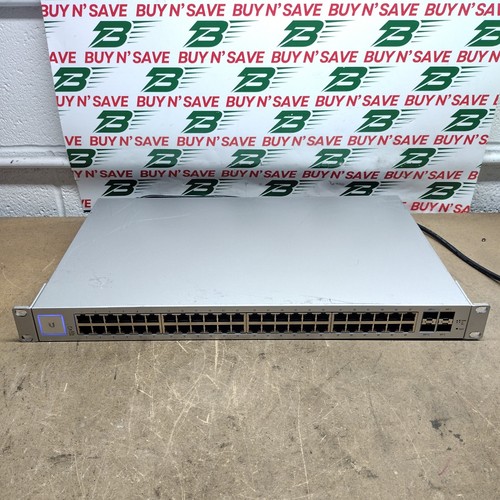
The US-48 is the 48-port sibling of the US-24 in Ubiquiti's first-generation UniFi switches, from the same 2016 datasheet. Its draw for home-labbers is two SFP+ ports that run at 10G, next to two 1G SFP ports and 48 gigabit RJ45 ports. You can run a 10G link to a NAS or a server, or uplink to another switch, on a box that's otherwise a quiet office switch. It's 1U with an internal supply and a fan, draws 56 W at most and has an RJ45 serial console. Like all UniFi switches it's set up from the free UniFi Network app, with VLANs, link aggregation, spanning tree and 802.1X, and it switches at layer 2 only. It has no PoE. The PoE versions are the US-48-500W and US-48-750W. Ubiquiti now calls it the Standard 48 (Gen1) and was still shipping firmware for it in 2026. The Gen2 USW-48 has four 1G SFP ports and no SFP+, so check the model number.
US-48, this model (no PoE)US-48-500W and US-48-750W, the PoE versions with 802.3af/at and 24 V passive PoEUSW-48, the Gen2 Standard 48 with four 1G SFP ports and no SFP+US-24, the 24-port sibling with no SFP+
UniFi switch firmware; needs UniFi Network 6.3.51 or later
Power
Internal 100 to 240 V AC supply; 56 W max
Cooling
Fan; 0.7 to 13.5 dB above a 27.5 dBA background
Size
1U rack, 443 × 286 × 43 mm, 3.56 kg without brackets
Also listed as
US-48, US 48, US48, UniFi Switch 48, UniFi Standard 48 Gen1
Typical eBay ask (Oct 15, 2026)
$190–$320
Lab check
License, support, noise and ports
License and feature set
There's no license. It's configured from the UniFi Network app, which Ubiquiti gives away with no separate software, licensing or support fee. The only thing to clear is the previous owner's adoption, because a UniFi switch stays tied to the controller that adopted it until it's forgotten or reset.
Software and support
It runs UniFi switch firmware, delivered through the UniFi Network app, and there's a debug terminal for the command line. Ubiquiti now calls it the Standard 48 (Gen1). Its firmware server still lists new builds for it, most recently 7.5.15 in September 2026.
Fans and power
It has a fan with two speed levels. Ubiquiti's datasheet rates it at 0.7 dB above a 27.5 dBA background at fan level 0 and 13.5 dB above at level 1, but doesn't say how many fans. Maximum draw is 56 W from the internal supply.
Ports and optics
48 gigabit RJ45 ports, two SFP+ ports that run at 1G or 10G, and two 1G SFP ports. Optics and DAC cables don't come with the switch, so check the photos for any modules in the SFP+ cages. The RJ45 serial port gives out-of-band access.
Reset and console
Ubiquiti's gen1 UniFi switch guides say to hold reset for more than five seconds to restore defaults. Before adoption the SSH login is ubnt/ubnt on older UniFi devices. The same guides set the RJ45 console at 115200 8N1 with a rollover cable.
Should come with it
AC power cord
Rack-mount brackets
SFP+ modules or DAC cables (not supplied)
Check the listing photos against this list, and ask the seller about anything you can’t see. A missing piece should come off the price.
What to check
If UniFi Network shows it as Managed by Other, it's still adopted to another controller and needs a factory reset before you can adopt it. Beyond that, most trouble is the previous owner's setup and missing brackets or optics, not the hardware.
01Model: Check the label in the photos says US-48 with no 500W or 750W after it. Those suffixes mean a PoE model.
02Gen1 or Gen2: Look at the photos for a small touchscreen. If there is one, it's the Gen2 USW-48, which has no SFP+.
03SFP+ ports: Count the fiber cages in the photos. You want two SFP+ and two SFP, four in all.
04Optics: Check the photos for SFP+ modules or DAC cables if you need 10G. They're sold separately, so plan to add them if the cages are empty.
05Adoption: Ask the seller to forget it in their UniFi Network app before shipping. Then it'll adopt cleanly into yours after a reset.
06Reset: On arrival, hold reset for more than five seconds with it powered. It should appear in UniFi Network ready to adopt.
07Fan: Power it up on arrival and listen. It should be barely above room noise with the fan on its low level.
08Rack brackets: Look for the two rack brackets in the photos. Without them it can only sit on a shelf.
09Console: Use an RJ45-to-DB9 rollover cable on the console port at 115200, 8N1. You should get a login prompt.
We'd buy audioguys312's US-48 titled tested at $211 delivered, near the bottom of the band, with the power cord and rack ears in the photo. There are at least 36 for sale and most ask $190–320 delivered, though plain US units with free shipping start at $170, like buynsave2018's with a power cord. The reason to pick it over the US-24 is the two SFP+ ports, so count four fiber cages in the photos, check the label says US-48 with no 500W or 750W after it, and look for a touchscreen, which marks the Gen2 USW-48 with no SFP+. None of these titles include optics, so budget for SFP+ modules or DAC cables. Skip welsm1287's at $377 delivered from a zero-feedback account, and mediavision.solutions' $832 ask.
Listed now
36
For parts
0
Typical ask
$190–$320
Full range
$105–$650
★Cheapest
$128.36est. delivered
The lowest delivered US-48 here at $128, titled US-48-G1 and partially tested, with rack ears in the photo. Ask which ports were checked, and test both SFP+ ports when it arrives.
Titled tested, with the power cord and rack ears in the photo, and it's near the bottom of the band. Ask the seller to forget it from their UniFi controller before it ships.
Delivered prices include shipping as eBay quoted it to a US address on Oct 15, 2026. Many sellers charge by distance, so your total may differ. eBay shows yours before you pay.
Snapshot
For sale on eBay
8 of 36 listed
Checked . Some may have sold.
Delivered prices include shipping as eBay quoted it to a US address on Oct 15, 2026. Many sellers charge by distance, so your total may differ. eBay shows yours before you pay.